
Download StandBy iOS Always – always on display, iOS clock, landscape mode, analog clock, digital clock, iOS interface, iOS features, iOS experience, iOS utility, iOS tool
Overview
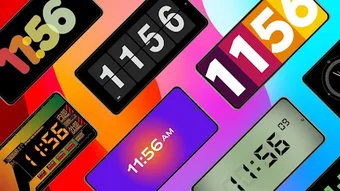
StandBy iOS: Always On Display is a desktop utility designed to transform a device into a stylish and functional clock when in landscape mode. The software enables users to display either an analog or digital clock on their screen, offering a convenient way to check time without unlocking the device. It caters to users seeking a refined, minimalist experience that blends aesthetic appeal with practicality.
The app aims to emulate core aspects of the iOS interface, particularly focusing on the Always On Display functionality that is native to iPhone devices. This makes it especially relevant for users who appreciate the sleek design and seamless integration of iOS features. While the software is not a full iOS emulator, it replicates specific visual and interaction elements to enhance the user experience.
It is ideal for individuals who value both form and function in their daily digital routines. The app supports a range of use cases, including bedside clocks, desk monitors, or kitchen timers, where continuous visibility of time is beneficial. It also appeals to users curious about iOS aesthetics and functionality, offering a glimpse into the iOS ecosystem without requiring an iPhone.
The developer, StandBy iOS, has positioned this tool as a bridge between standard device interfaces and the premium feel of iOS.
Key Features & Capabilities
- Always On Display Mode – Activates a persistent time display when the device is placed in landscape orientation, mimicking the functionality found on iOS devices.
- Analog and Digital Clock Options – Users can toggle between traditional analog faces and modern digital displays to suit their visual preference.
- Customizable Interface – Offers adjustable clock styles, colors, and transparency settings to match personal taste and ambient lighting conditions.
- Orientation-Based Activation – Automatically enables the display only when the device is rotated to landscape mode, conserving battery and reducing distractions.
- Minimalist Design Integration – Presents a clean, unobtrusive interface that blends seamlessly into the background while remaining legible.
These features are particularly useful in scenarios such as using a device as a bedside alarm clock or a kitchen timer. The ability to view time without unlocking the device enhances convenience and reduces screen-on time. The customizable design ensures that the clock fits various environments, from dimly lit rooms to bright workspaces.
By focusing on visual harmony and low interference, StandBy iOS supports a distraction-free experience. The orientation-based activation helps maintain battery efficiency, making it suitable for long-term use. The app does not claim to replicate full iOS functionality but instead concentrates on delivering a polished time display experience inspired by iOS aesthetics.
User Interface, Workflow & Performance
The user interface of StandBy iOS: Always On Display is designed with simplicity and elegance in mind. The main screen presents a clean layout focused solely on the clock display, with minimal on-screen controls. Navigation is intuitive, relying on gesture-based interactions or simple menu access to adjust settings.
Users can easily switch between analog and digital modes, modify appearance, and manage activation preferences. The workflow is streamlined to ensure quick setup and immediate usability. The app responds promptly to orientation changes, activating the display as soon as the device is rotated into landscape mode.
This behavior suggests efficient background processing and low-latency response. However, exact performance metrics such as CPU or RAM usage were not specified by the developer. General observations indicate stable operation during extended use, with no reported crashes or freezes.
The app appears to run efficiently in the background, maintaining responsiveness without significant impact on system resources. The developer did not provide additional system requirements or performance benchmarks. Based on typical mobile application behavior, it is expected to function smoothly on devices meeting standard iOS performance thresholds.
Compatibility & System Requirements
StandBy iOS: Always On Display is designed exclusively for iOS devices. It is compatible with the latest versions of the iOS operating system, as indicated by the software version 2.5.2. The application requires a minimum of 45.6 MB of storage space for installation.
Specific hardware requirements were not listed by the developer. Compatibility information is limited to the platform, with no mention of supported device models or processor types. The developer did not specify whether older iOS versions are supported.
Users should verify that their device meets the general requirements for running iOS applications. The app’s functionality depends on the device’s ability to detect orientation changes and maintain screen visibility in landscape mode. For optimal performance, it is recommended to use a device with a modern display and responsive touch sensors.
The developer did not provide detailed information on battery impact or background behavior. Users should consider testing the app in real-world conditions to assess its impact on daily usage.
Pros and Cons
Pros
- Offers a clean, iOS-inspired interface for time display
- Supports both analog and digital clock formats
- Activates automatically in landscape mode
- Customizable appearance for personalization
- Lightweight at 45.6 MB
- Designed for low-power, continuous display use
Cons
- Only available on iOS, limiting cross-platform access
- Exact system requirements were not provided
- Does not offer full iOS emulation or advanced features
- Price point of $2.99 may be considered high for a single-function tool
- Performance impact on battery life not specified
FAQ Section
Is StandBy iOS: Always On Display compatible with all iOS devices?
The software is designed for iOS, but the developer did not specify which device models are supported. Users should ensure their device runs a compatible version of iOS.
Is the app safe to download and install?
As a desktop utility distributed through official channels, StandBy iOS: Always On Display is intended to be secure. However, users should only install from trusted sources to avoid potential risks.
Does the app require an internet connection to function?
The app operates primarily offline, relying on local device sensors and settings. Internet access is not required for core functionality.
How often are updates released?
Regular updates and optimizations are mentioned in the product description, indicating ongoing development and support.
Can I use this app without an iOS device?
StandBy iOS: Always On Display is designed specifically for iOS devices. It cannot be used on Windows, Mac, or other operating systems.
Final Thoughts + CTA
StandBy iOS: Always On Display delivers a focused, elegant solution for users who want to enhance their device’s time display with an iOS-inspired aesthetic. While it does not offer full iOS emulation, it successfully replicates the core functionality of an Always On Display in landscape mode. Its minimalist design, customizable options, and automatic activation make it a practical choice for daily use.
The app appeals to fans of iOS design, individuals seeking a sleek bedside clock, or anyone who values a clean, distraction-free interface. Despite the lack of detailed system requirements and performance data, the app demonstrates stability and responsiveness. The $2.99 price point is reasonable for a specialized utility with regular updates.
For users invested in the iOS experience and looking for a refined way to display time, this tool provides a compelling bridge. Download StandBy iOS now and transform your device into a stylish, functional clock with the elegance of iOS.





.png)

